November 10, 2026 · 9 min read · Agentic AI · Orchestration · Decision guide
LangGraph, CrewAI, OpenAI, Google, Microsoft, Claude: which agentic orchestration framework should you choose?
Six frameworks, six ways to orchestrate agents. What really sets them apart, when to pick which, and the pitfalls that show up in production whatever the logo.
Yassine Aqejjaj · HEAD OF AI · Updated on November 10, 2026
An agentic orchestration framework decides who does what, in which order, and with what shared state across several model and tool calls. The six most used follow four logics: the graph (LangGraph), role-based teams (CrewAI), the enterprise workflow (Microsoft Agent Framework, Google ADK) and the agent loop with delegation (OpenAI Agents SDK, Claude Agent SDK). The right choice depends on the control you need, not on popularity.
What does an orchestration framework actually do?
A single agent is a model in a loop, with tools. As soon as the work goes beyond one loop, three questions need an answer: who decides the next step (the code or the model), where state lives between two steps, and how a human takes back control. That is exactly what an orchestration framework settles.
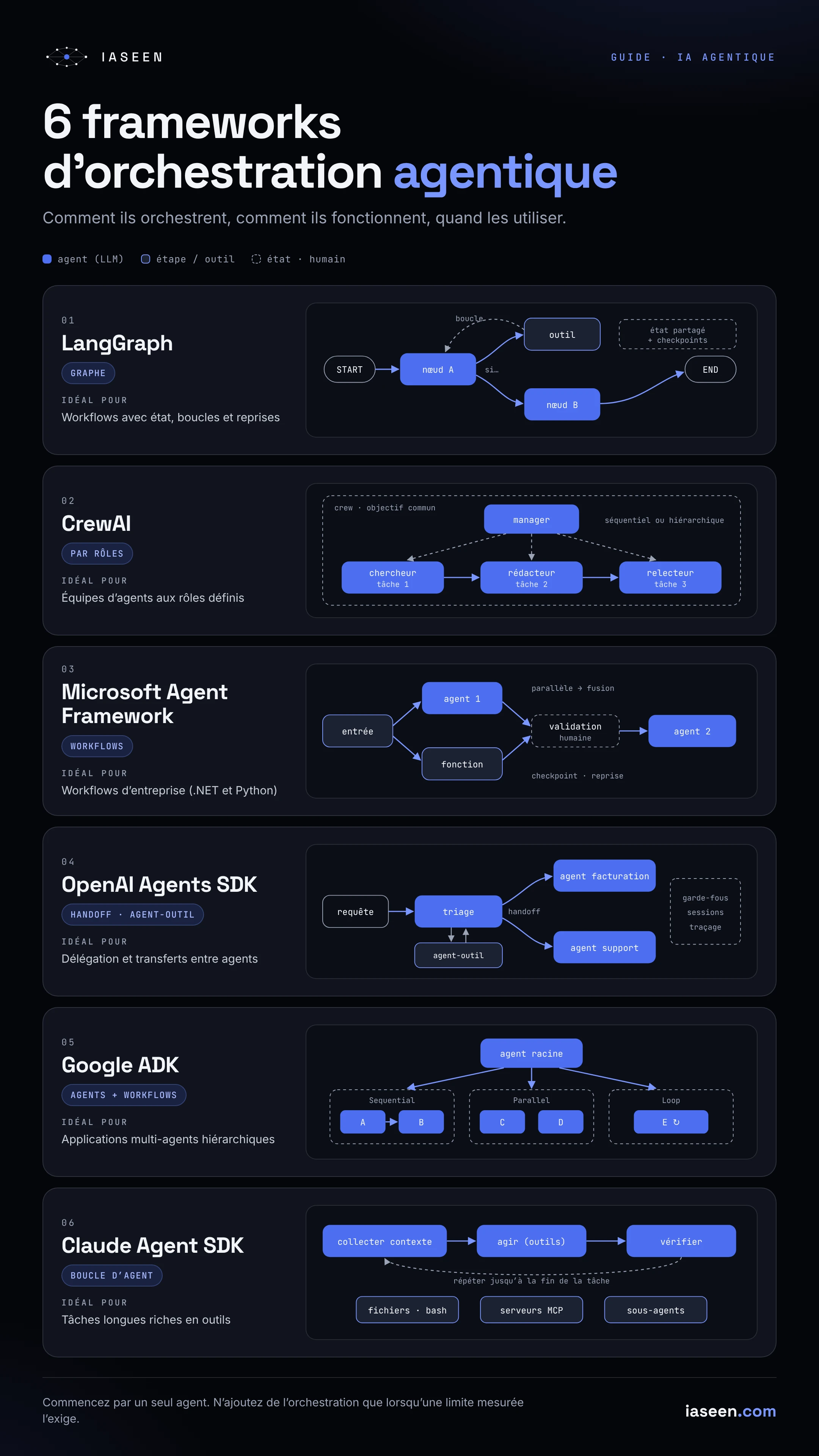
The six frameworks in the infographic answer the first question differently, and it is the most important one. At one end, the developer draws the path and the model only fills in the boxes. At the other, the model chooses its own tools and delegations, and the code only sets limits. Every shade exists in between.
Logic
- Graph
- Roles
- Workflow
- Delegation
- Hierarchy
- Loop
Framework
- LangGraph
- CrewAI
- Microsoft Agent Framework
- OpenAI Agents SDK
- Google ADK
- Claude Agent SDK
What are the six main approaches?
LangGraph: the stateful graph. You describe the application as a graph: nodes (a model call, a tool, a function) linked by edges, some of them conditional. A typed state flows from node to node and can be saved at every step (checkpoint), which lets you resume an interrupted run, replay a past state or pause the graph for human approval. It is the option that gives the most explicit control, at the cost of a bit more code.
CrewAI: the team of roles. You define agents by their role, goal and background, then the tasks you give them. The crew runs them in sequence or under the coordination of a manager agent. The mental model is very readable for business teams: you describe a team the way you would describe an organisation. For the parts that must stay deterministic, CrewAI also offers event-driven Flows.
Microsoft Agent Framework: the enterprise workflow. It is the successor to Semantic Kernel and AutoGen, released as version 1.0 in April 2026 for .NET and Python. It clearly separates the agent (a model that calls tools) from the workflow: a typed graph that chains agents and functions, with branches, parallelism, checkpoints and human approval. It carries over the orchestration patterns from AutoGen (sequential, concurrent, handoff, group chat, Magentic-One) and connects to several model providers, to MCP and to A2A.
OpenAI Agents SDK: delegation. The SDK rests on few primitives: agents, tools, handoffs (one agent passes the conversation to a more specialised agent) and agents used as tools (one agent calls another and keeps control). On top come guardrails on inputs and outputs, sessions for conversation memory and built-in tracing. It is the lightest approach for triage followed by a transfer to the right specialist.
Google ADK: agents and workflows, in a hierarchy. The Agent Development Kit combines model-driven agents with deterministic workflow agents: sequential, parallel and loop. You nest them in a tree, under a root agent. ADK is optimised for Gemini and Google Cloud but stays open to other models, and it supports the A2A protocol so agents can talk across systems.
Claude Agent SDK: the tool-equipped agent loop. The SDK exposes the loop that runs Claude Code: the model gathers context, acts with tools (files, commands, MCP servers), verifies the result and starts again until the task is done. Orchestration goes through subagents, which work in their own context and only return their result, and through hooks that can block a tool call before it runs. It is built for long, tool-heavy tasks where you cannot draw the path in advance.
Which one should you choose, depending on your situation?
The table below is my own reading, not a benchmark. It compares what matters when you decide.
| Framework | Who decides the next step | Strength | I would pick it if… | Watch out for |
|---|---|---|---|---|
| LangGraph | The code (graph), the model inside nodes | State, resumption, human approval | The process is long, with loops and retries | More code to write and maintain |
| CrewAI | The model, within a frame of roles | Readability, fast prototyping | The work looks like a team of specialists | Less predictable behaviour in hierarchical mode |
| Microsoft Agent Framework | The code (workflow), the model inside agents | .NET/Azure integration, ready-made orchestration patterns | The company already runs on the Microsoft ecosystem | Recent framework: follow its changes |
| OpenAI Agents SDK | The model (handoffs, agents as tools) | Simplicity, built-in tracing | Triage then transfer to the right specialist | Delegation logic to bound and test |
| Google ADK | Mixed: deterministic workflows + agents | Agent hierarchies, A2A | Several agents to compose, on Google Cloud | Keep deterministic and non-deterministic parts clearly apart |
| Claude Agent SDK | The model (agent loop) | Open-ended tasks, tools, subagents | The task is long and the path unpredictable | Cost and run time to cap |
Which rules help you decide?
Three simple rules spare me most bad choices:
- If you can draw the process, draw it. A graph or a workflow (LangGraph, Microsoft Agent Framework, ADK workflows) is easier to test, to audit and to get signed off by the business.
- If the path depends on what the agent discovers, let the model drive, but inside a box. That is the territory of the agent loop and delegation (Claude Agent SDK, OpenAI Agents SDK), with limits on steps, cost and tools.
- Choose first the ecosystem your teams know how to run. An average framework run well beats an excellent framework nobody can debug at 2 a.m.
Which pitfalls show up in production?
The choice of framework rarely makes a project fail. What gets stuck is the same set of topics, whatever the logo.
State. An agent that works for several minutes, or waits for approval, must be able to stop and resume without starting over. Check where state is stored, whether it survives a restart and who can read it. The checkpoints in LangGraph or Microsoft Agent Framework answer this question; in a freer approach, it is up to you.
Human in the loop. “A human approves” is not a specification. You have to decide which actions require approval (sending, paying, deleting, publishing), who approves, within what time, and what happens without an answer. Design these stop points from the start: adding them afterwards often forces you to rework the whole orchestration.
Observability. Without a trace of every model and tool call, a multi-agent system becomes a black box. Require from day one a trace per run: prompts, tools called, arguments, results, duration and cost. All the SDKs offer some form of tracing, but check that it exports to your own tools (OpenTelemetry, for instance) rather than staying with a vendor.
Cost. Every extra agent, every reflection loop, every delegation adds model calls. Set step and token budgets per run, measure the cost per successful task, and alert on extreme runs. An agent that loops does not only cost time.
Dependency and sovereignty. Three of the six frameworks come from model providers, two from cloud vendors. They all work best with their home ecosystem, even when they accept other models. Ask three questions before committing: can you change model without rewriting the orchestration? Where are traces and state hosted? What happens if a hosted feature disappears or changes price? For sensitive data, keep the business logic (tools, rules, prompts) in your own code, and treat the framework as a replaceable layer.
Where should you start?
My advice stays the same whatever the framework: start with a single agent, with two or three tools and tracing. Measure where it fails. Only add a second agent, a graph or a delegation when a measured limit calls for it. Most enterprise use cases do not need six agents talking to each other: they need a clear process, a reliable agent and a human in the right place.
FREQUENTLY ASKED QUESTIONS
What is agentic orchestration?
It is how you coordinate several model calls, tools and agents to carry out a task: who acts, in which order, with what shared state, and where a human steps in.
Do you need a framework to build an agent?
No. A simple agent can be written with a model’s API and a few functions. A framework becomes useful when you have to manage state, resumption, several agents or human approvals.
What is the difference between a handoff and an agent used as a tool?
With a handoff, one agent passes the conversation to another, which takes over. With an agent as a tool, the main agent calls another agent for a subtask, gets the result back and keeps control.
Graph or agent loop: how do you decide?
If you can draw the steps, prefer a graph or a workflow: it is more predictable and easier to audit. If the path depends on what the agent discovers along the way, an agent loop bounded by limits on steps, cost and tools fits better.
Can you switch framework later?
Yes, if you planned for it: keep your tools, prompts and business rules in your own code, and export your traces in a standard format. The framework should only be a replaceable orchestration layer.
RESULTS
6
frameworks compared
4
orchestration logics: graph, roles, workflow, loop
5
production pitfalls: state, human, observability, cost, dependency
1
agent to start with, before any orchestration
RELATED CASE STUDY
KEEP READING
Figures come from validated client results and from my role at Devoteam. The projects on GitHub are public betas.